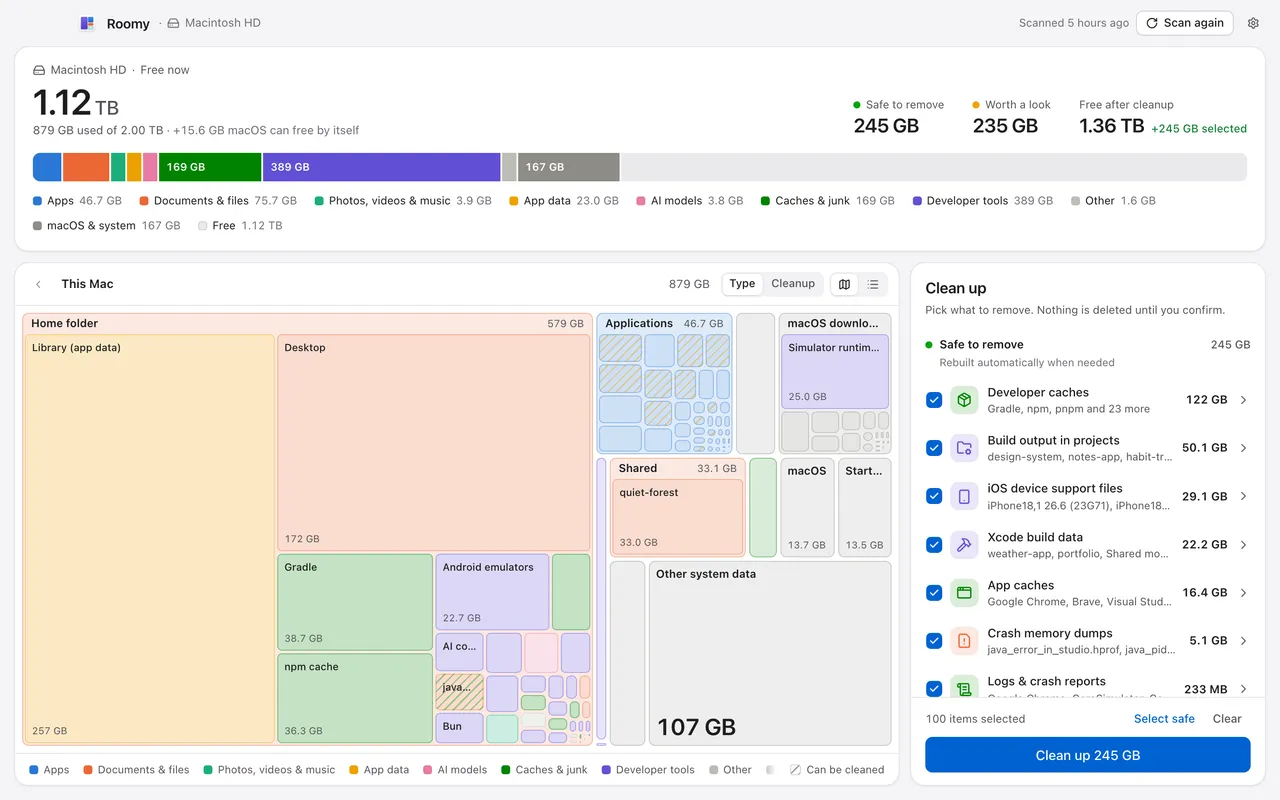
Storage settings lump a big part of your disk into “System Data” and stop there. Roomy names everything in plain words and shows the exact folders behind every gigabyte.
Apps
Documents & files
Photos, videos & music
App data
AI models
Caches & junk
Developer tools
macOS & system
Macintosh HD · Free now
1.12TB1.36TB
Safe to remove
245GB
Apps46.7 GB
Documents & files75.7 GB
Photos, videos & music3.9 GB
App data23.0 GB
AI models3.8 GB
Caches & junk169 GB
Developer tools389 GB
Other1.6 GB
macOS & system167 GB
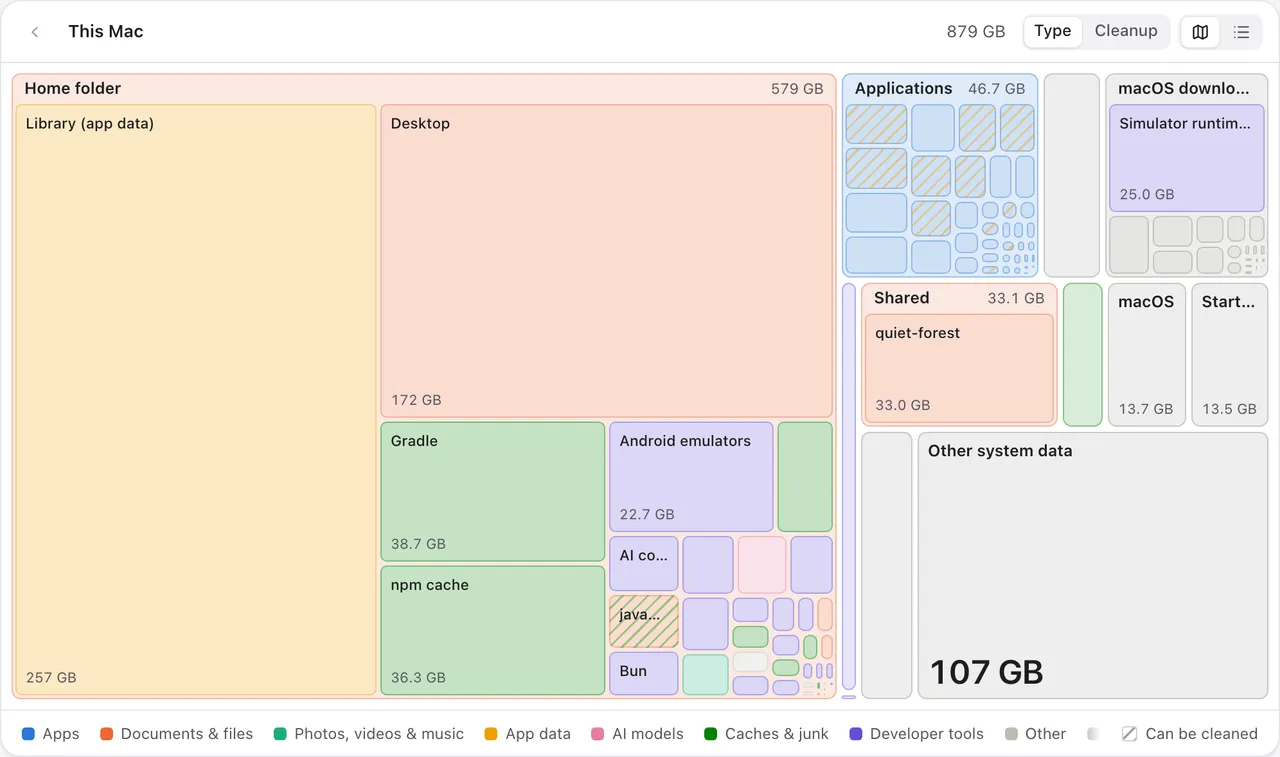
Striped = can be cleaned. Roomy counts shared (cloned) files once, so this is space you really get back.
A map of your whole disk. Every folder is a tile sized by the space it uses. Click to look inside, switch to a list, or color the map by what can be cleaned.
Why is my Mac’s storage full?
Most Macs fill up with things Finder doesn’t show: app caches, logs, Xcode and simulator files, iPhone backups, downloaded AI models and leftovers from apps you no longer use. macOS groups most of this under “System Data”. Roomy scans your whole Mac in about a minute and sorts every gigabyte into clear groups like Apps, Documents, Caches & junk, Developer tools and macOS & system, each linked to the folders behind it. It counts files the way APFS stores them: copies that share space (clones) and hard links are counted once, so the space it says you can free is the space you actually get back.
Focused on cleanup
Clean up, and nothing else.
No speed boosters, no antivirus, no memory cleaners. Roomy does one job: it finds what you don’t need and clears it safely, in one click.
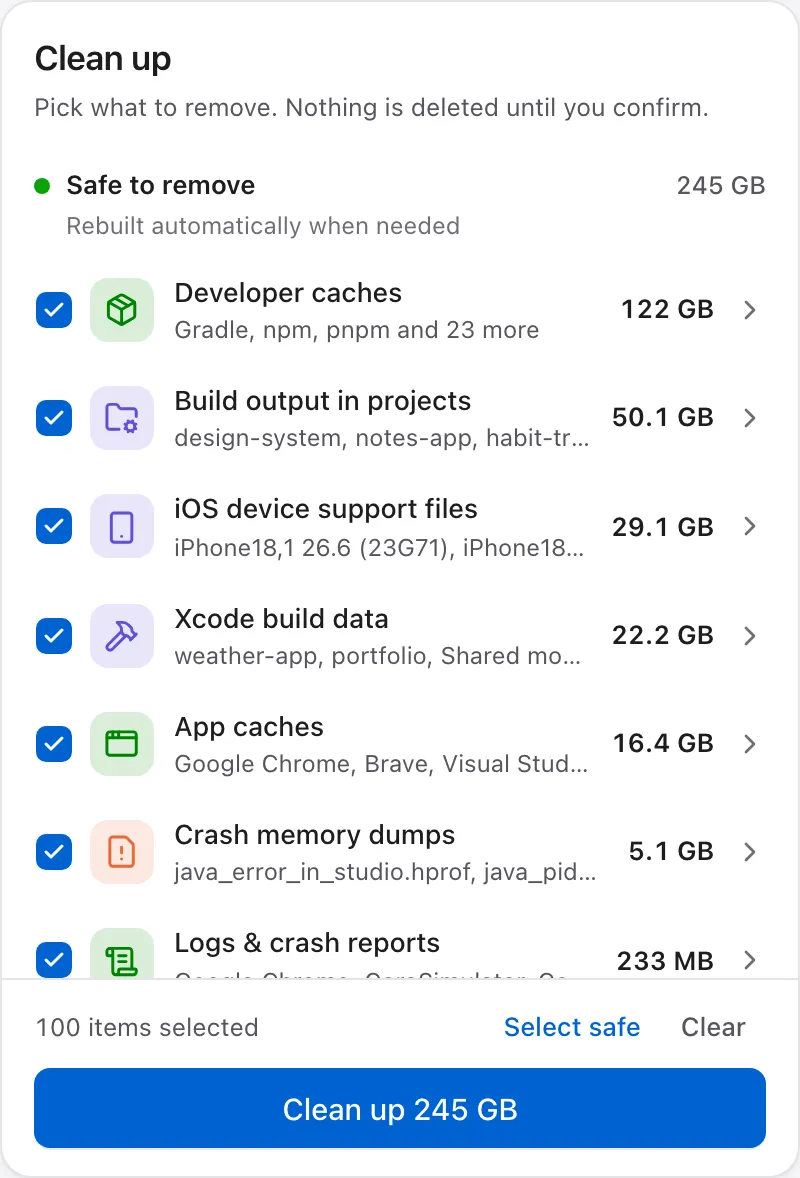
Safe to remove
Caches, logs, build files and crash dumps. Apps rebuild them automatically when they need them.
Review first
Your own things: old downloads, big videos, unused apps. They go to the Trash, so you can change your mind.
What Roomy finds
App caches
Logs & crash reports
Old downloads
Large files
Apps you don’t use
Old iPhone backups
Xcode build data
iOS simulators
node_modules
npm, pnpm & Gradle caches
Rust target folders
Android emulators
Docker data
AI models
Freed
245GB
Easy to use
Three steps. No manual needed.
Roomy talks like a person, not a file system. If you can empty the Trash, you can use Roomy.
1
Step 1: Scan
Click “Scan my Mac”. Roomy reads file sizes only. It never opens or uploads your files, and a full scan usually takes about a minute.
2
Step 2: See
Your disk as a colored map and plain-language groups, biggest first. Every recommendation says what it is and what happens if you remove it.
3
Step 3: Clean
Pick what to remove, check the summary of exactly what will happen, and confirm. Nothing is touched until you say so.
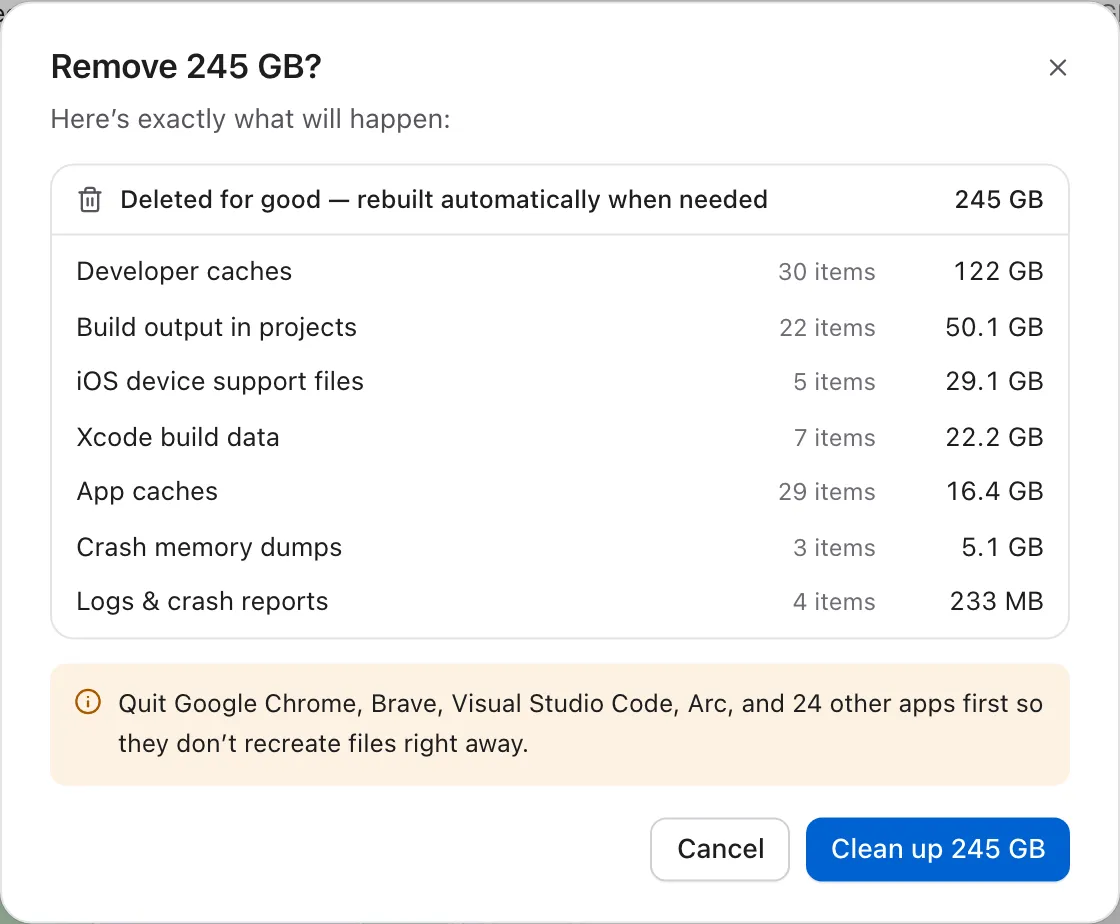
You always see exactly what will happen.
Before anything is removed, Roomy lists every group, how many items it holds and where it goes: rebuildable files are deleted, your own files go to the Trash.
Convenient
Stays out of your way until it’s needed.
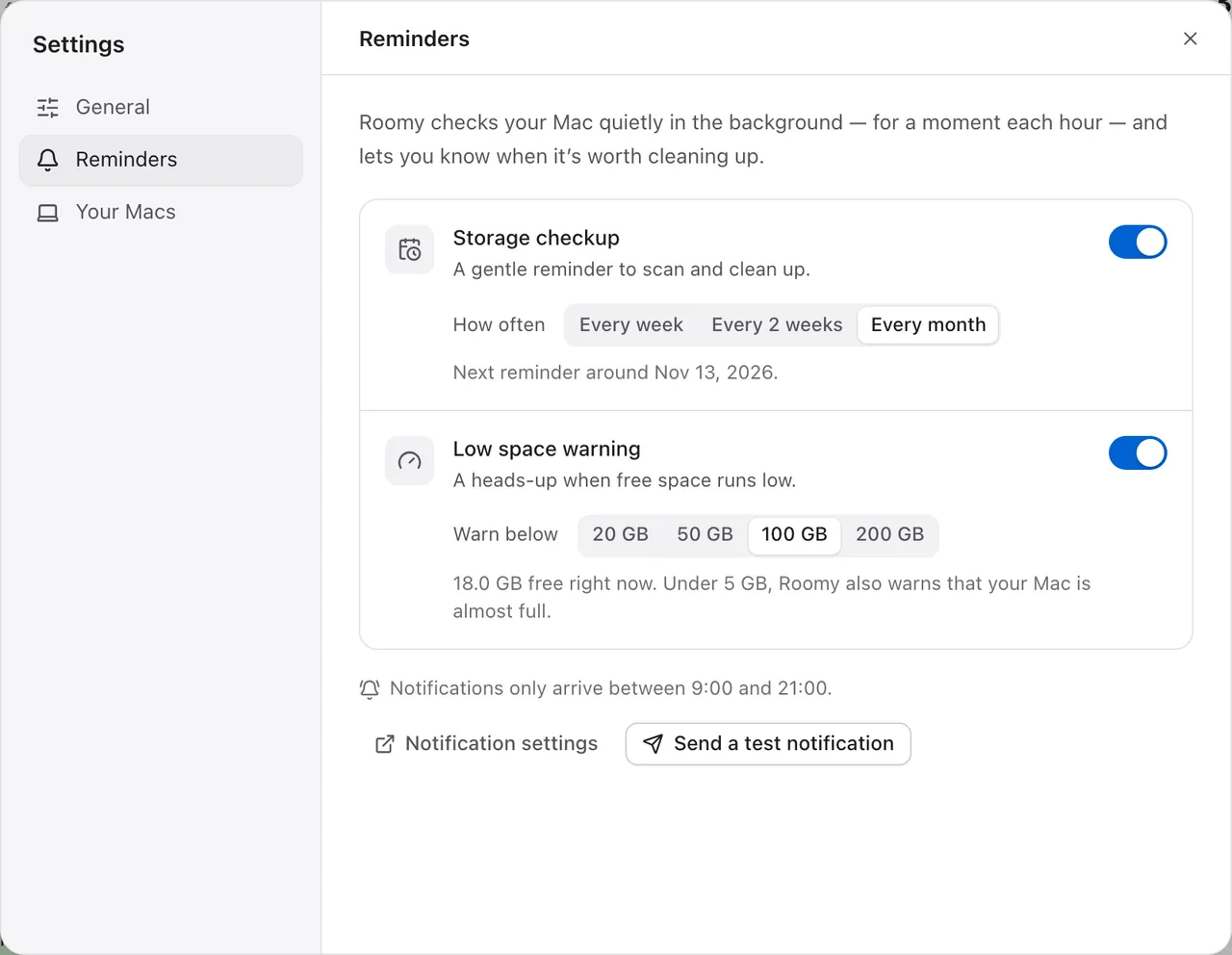
You hear from Roomy only when it’s time for a checkup or your Mac is running out of room. No menu bar icon, and nothing left running.
About a minute
Open Roomy and click Scan. That’s the whole setup.
Checkup reminders
Every week, two weeks or month, counted from your last scan.
Low-space warnings
Pick 20, 50, 100 or 200 GB. Under 5 GB, Roomy tells you your Mac is almost full.
Quiet hours
No notifications between 9 PM and 9 AM. Ever.
Every Mac you own
Unlock once. Your other Macs unlock through your own iCloud Drive.
Light as a feather
A 10 MB app. Reminders run for a moment each hour, then quit.
Your Mac is running low on space
now
Only 18 GB left. Last time Roomy found 245 GB that’s safe to remove.
Careful by default
Built to never touch what matters.
A cleanup should free space, not cost you a photo or a password.
Hands off what matters
iCloud Drive, your Photos library, Mail, Messages, Keychain and SSH keys are never touched.
Trash, not gone
Your own files go to the Trash, so you can put them back.
See it first
A clear summary of what will be removed. Nothing happens until you confirm.
Only what you pick
Roomy removes only the items you select and confirm, and checks every path again right before cleaning.
Apple’s own tools
iOS simulators and runtimes are removed with Xcode’s own command, the way Apple intends.
Private by design
No account, no analytics, no tracking. Your files never leave your Mac.
Honestly cheap
$1.99. Once. For every Mac you own.
Less than a cup of coffee, and no subscription, ever.
Prices in US dollars; local taxes are added at checkout where they apply. Payments are processed by Polar, our merchant of record. Scanning, the map and recommendations stay free on every Mac.
Yes. Roomy is free on one Mac: you can scan, explore your storage and clean up without paying. To clean up on more than one Mac, buy Roomy for all your Macs once for $1.99. There is no subscription. Scanning, the storage map and recommendations stay free on every Mac.
What is “System Data” on a Mac?
System Data is the catch-all group macOS uses in Storage settings for anything that does not fit its other categories: app caches, logs, Xcode and simulator files, iPhone backups, downloaded AI models and the files apps keep in your Library folder. Roomy breaks this group apart into plain-language categories and shows the exact folders behind each one, so you can see what is really using the space.
Is it safe to delete caches on a Mac?
Usually, yes. App and developer caches are temporary copies that apps rebuild when they need them; the only side effect is that the next launch or build may be a little slower. Roomy marks these as “Safe to remove”. Your own data, like old downloads or large videos, is listed separately under “Review first” and goes to the Trash instead of being deleted.
Does Roomy upload my files or collect data?
No. Roomy reads file names and sizes on your Mac and never opens, uploads or shares your files. There is no account, no analytics and no tracking. The only time Roomy contacts a server is to check a license key after you buy, through our payment partner Polar.
How long does a scan take?
Usually about a minute for a whole Mac, depending on how many files you have and how fast your disk is. You click one button; Roomy does the rest and shows the results as soon as it finishes.
Can I undo a cleanup?
Your own files, such as downloads, videos and apps you no longer use, go to the Trash, so you can put them back until you empty it. Caches and build files are deleted, because macOS and your apps recreate them automatically when they are needed again. Nothing is removed until you confirm.
Why does Roomy ask for Full Disk Access?
macOS hides a few folders from all apps unless you allow it, such as Mail, Messages, Safari and the Trash. Full Disk Access is optional: without it Roomy still scans everything else and shows the hidden part as “Other system data”. Roomy only reads sizes in those folders.
Which Macs does Roomy work on?
Roomy runs on Macs with Apple silicon (M1 or later) using macOS 13.3 Ventura or later. The app is about 10 MB.
How does one purchase cover all my Macs?
Buy once and enter your license key on any Mac. Roomy keeps a tiny file in your own iCloud Drive, so your other Macs signed in to the same iCloud account unlock by themselves. You can also enter the key on each Mac yourself.
How is Roomy different from other Mac cleaners?
Roomy focuses on one job: showing where your disk space goes and clearing what you do not need. There are no speed boosters, antivirus scans or memory cleaners. Every recommendation is explained in plain words, files shared between folders are counted only once, and it costs $1.99 once with no subscription.
How much free space should a Mac have?
A good rule of thumb is to keep about 10% of your disk free, and never let it drop below a few gigabytes. When free space runs low, apps can slow down and macOS updates may fail to install. Roomy can warn you when free space drops below a level you choose (20, 50, 100 or 200 GB), and again if it falls under 5 GB.
Make room on your Mac.
See where your space went and clear it in a minute. Free on one Mac, $1.99 once for every Mac you own.